
An email address at your own domain shows your clients, customers and visitors that you are a professional entity. It also creates a level of trust that people are contacting your organization.
In this brief tutorial, we'll explain how to setup an email address @YourDomain.com and check it on the Internet.
STEP 1: Access your NeroNext Dashboard.
STEP 2: Access your cPanel
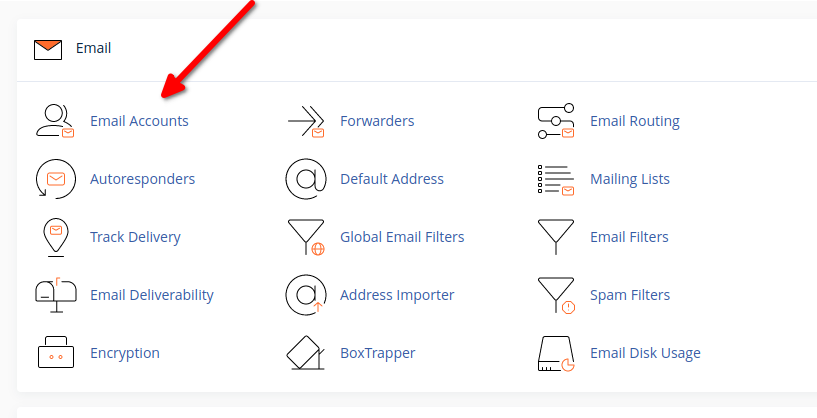
STEP 3: Once in to the cPanel interface, scroll down to the Email tab within the cPanel interface. Click Email Accounts then the blue Create button.
STEP 4: Here, you can create specific email accounts for your domain name. In order to create an account, simply fill out the fields!
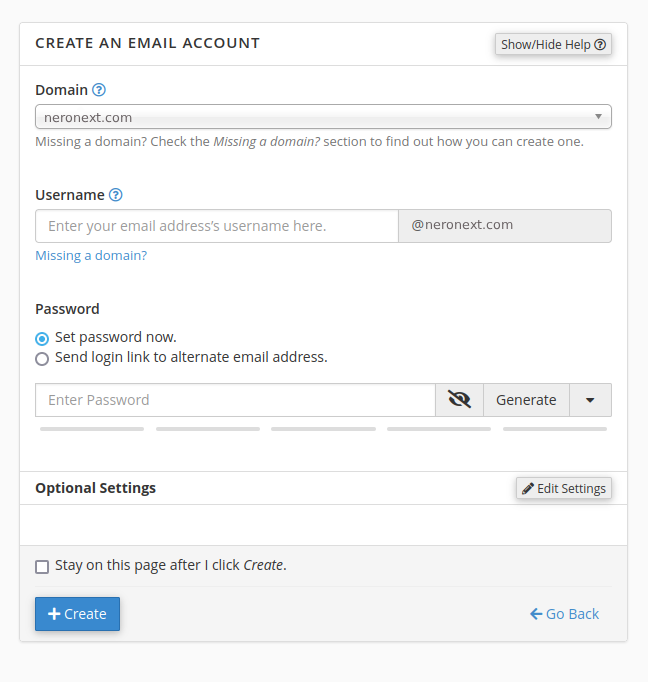
STEP 5: Click the blue Create button (pictured above) and the account is setup.